
Web Search & Tools
ai.KMITL provides powerful tools that extend the AI's capabilities beyond its training data. This guide covers how to use web search, supermemory, and other integrated tools.
Web Search
What is Web Search?
Web search allows the AI to:
- Search the internet in real-time
- Access current information
- Find recent news and updates
- Get data beyond its training cutoff date
Enabling Web Search
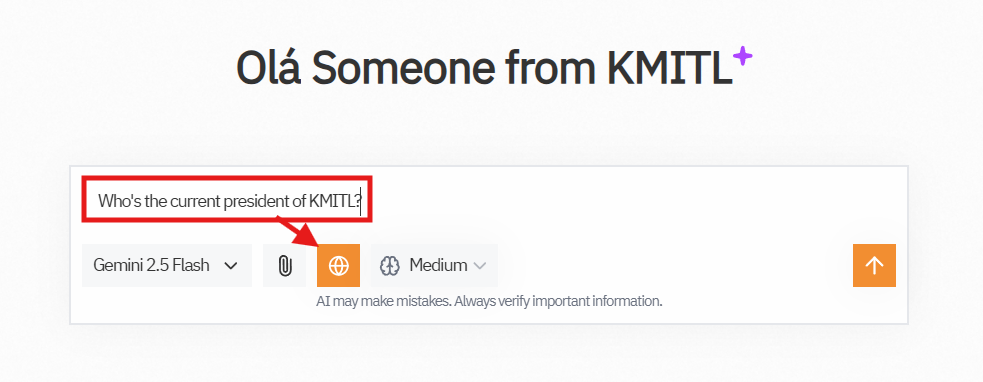
To enable Web Search, simply click the Globe icon located in the chat toolbar below the message input box.
- When web search is enabled, the Globe icon will appear highlighted (see image above).
- If the button appears gray, web search is currently disabled.
Enabling web search allows the AI to access up-to-date information and answer questions about recent news, current events, or anything beyond its training data.
You can toggle this feature on or off at any time before sending your message.
When to Use Web Search
Use web search for:
- ✅ Current events: "What happened in the news today?"
- ✅ Latest information: "Is "เสนาหอย" play as Superman?"
- ✅ Real-time data: "What's the weather in Bangkok?"
- ✅ Recent releases: "When is the next iPhone coming out?"
- ✅ Product information: "Best laptops under 30000 baht"
- ✅ Recent updates: "Latest features in ChatGPT"
Don't need web search for:
- ❌ General knowledge: "What is photosynthesis?"
- ❌ Historical facts: "When did World War 2 end?"
- ❌ Programming help: "How to write a for loop in Python?"
- ❌ Math problems: "Solve this equation"
- ❌ Creative writing: "Write me a story"
- ❌ Analysis of uploaded files: The AI already has the file
How Web Search Works
When web search is enabled:
- You send a message
- AI determines if search is needed
- Searches relevant websites (if needed)
- Reads the results
- Synthesizes information
- Responds with cited sources
Search Results
The AI will:
- Cite sources with links
- Summarize findings from multiple pages
- Compare information across sources
- Provide recent data when available
Example response:
According to Spin9arm <Link to Spin9arm>, Apple announced new iPhone 99 Pro Max...Search Providers
ai.KMITL uses multiple search providers:
- Brave Search - Privacy-focused
- Tavily - AI-optimized search
- Serper - Google-powered results
The system automatically uses Brave Search as the default provider.
Supermemory
What is Supermemory?
Supermemory is a knowledge base that:
- Stores information across conversations
- Remembers important facts
- Recalls previous discussions
- Provides long-term context
Coming Soon
Supermemory integration is currently in development and will be available soon!
How It Works
Once available, Supermemory will:
- Store key information you share
- Index important facts
- Recall relevant memories when needed
- Build a personal knowledge base
Use Cases
- Remember your preferences
- Recall project details
- Store frequently used information
- Build a personal wiki
MCP (Model Context Protocol)
What is MCP?
MCP allows integration with external tools and services:
- File systems - Access local files
- Databases - Query data sources
- APIs - Connect to web services
- Custom tools - Add specialized functions
Advanced Feature
MCP is designed for advanced users and requires additional setup.
Available MCP Servers
When enabled, you might have access to:
- File system access
- Database connections
- API integrations
- Custom tools specific to your needs
Enabling MCP Tools
- Go to Settings → AI Options → MCP Servers
- Configure MCP Servers
- Enable specific tools
Tool Usage Tips
Best Practices
For Web Search:
- Be specific about what you're looking for
- Mention dates if time-sensitive
- Ask for sources if you need citations
- Compare results for accuracy
General Tips:
- Enable tools only when needed to save processing time
- Disable tools for general conversations
- Check sources provided by web search
- Verify critical information from multiple sources
Example Queries
Good Web Search Queries:
✅ "What are the latest AI developments announced this week?"
✅ "Find current pricing for OpenAI API"
✅ "What's the weather forecast for Bangkok tomorrow?"
✅ "Latest news about KMITL"
Queries That Don't Need Web Search:
❌ "Explain machine learning"
❌ "Help me write Python code"
❌ "Solve this math problem"
❌ "Summarize this uploaded document"
Tool Indicators
Active Tools
When tools are active, you'll see:
- Web Search search results in chat area
- Tool icon and status indicator in the response
- Source citations in the response
- Search queries used in the response
Privacy & Data
Web Search Privacy
- Searches are proxied through secure servers
- Your IP address is not exposed to target sites
- Search history is not tracked externally
- Results are not stored permanently
Tool Data Handling
- Tool interactions are encrypted
- Data is processed securely
Troubleshooting
Web Search Not Working?
Check these:
- Is web search enabled in tools menu?
- Try rephrasing your query
- Check if the service is temporarily down
Slow Responses with Tools?
Web search adds time because:
- Searches multiple websites
- Reads and processes results
- Synthesizes information
Tips for speed:
- Disable tools for non-time-sensitive queries
- Be specific to reduce search scope
- Use faster AI models
Inaccurate Results?
If web search gives wrong info:
- Check the sources provided
- Try a different query
- Verify with multiple searches
- Report issues to support
Tool Limitations
Web Search Limitations
- Cannot access paywalled content
- May miss very recent updates (days old)
- Depends on search provider availability
- Some sites block automated or AI access
General Limitations
- Tools add processing time
- May occasionally fail
- Not available for all models
- Some features require BYOK
Tool Costs
BYOK
With your own API keys:
- Unlimited tool usage
- All features available
- You pay only for external API costs
- See BYOK guide
Experiment with Tools
Try enabling and disabling tools to see how they affect responses. You'll quickly learn when each tool is most useful!
Next Steps
- Learn about Project Folders
- Improve results with Better Prompts
- Check Settings for tool configuration