Usage Quotas
ai.KMITL provides generous included access with a monthly message limit. This guide explains how quotas work, how to monitor your usage, and what happens when you reach the limit.
Included Usage Overview
What You Get
- 1,000 messages per month included for everyone
- All AI models included
- All features available (web search, files, folders)
- No credit card required
- Automatic reset on the 1st of each month
Generous Limit
1,000 messages per month is plenty for most users. that's about ~33 messages per day!
How Messages Are Counted
What Counts as a Message
Each time you send counts as 1 message:
- ✅ Text message
- ✅ Message with file attachments
- ✅ Any message to any model
- ✅ Editing a message and regenerating the response
- ✅ Retrying a response
What doesn't count:
- ❌ AI responses (only your messages count)
- ❌ Browsing the interface
- ❌ Organizing folders
- ❌ Viewing and change settings
Checking Your Usage
Usage Display
View your current usage:


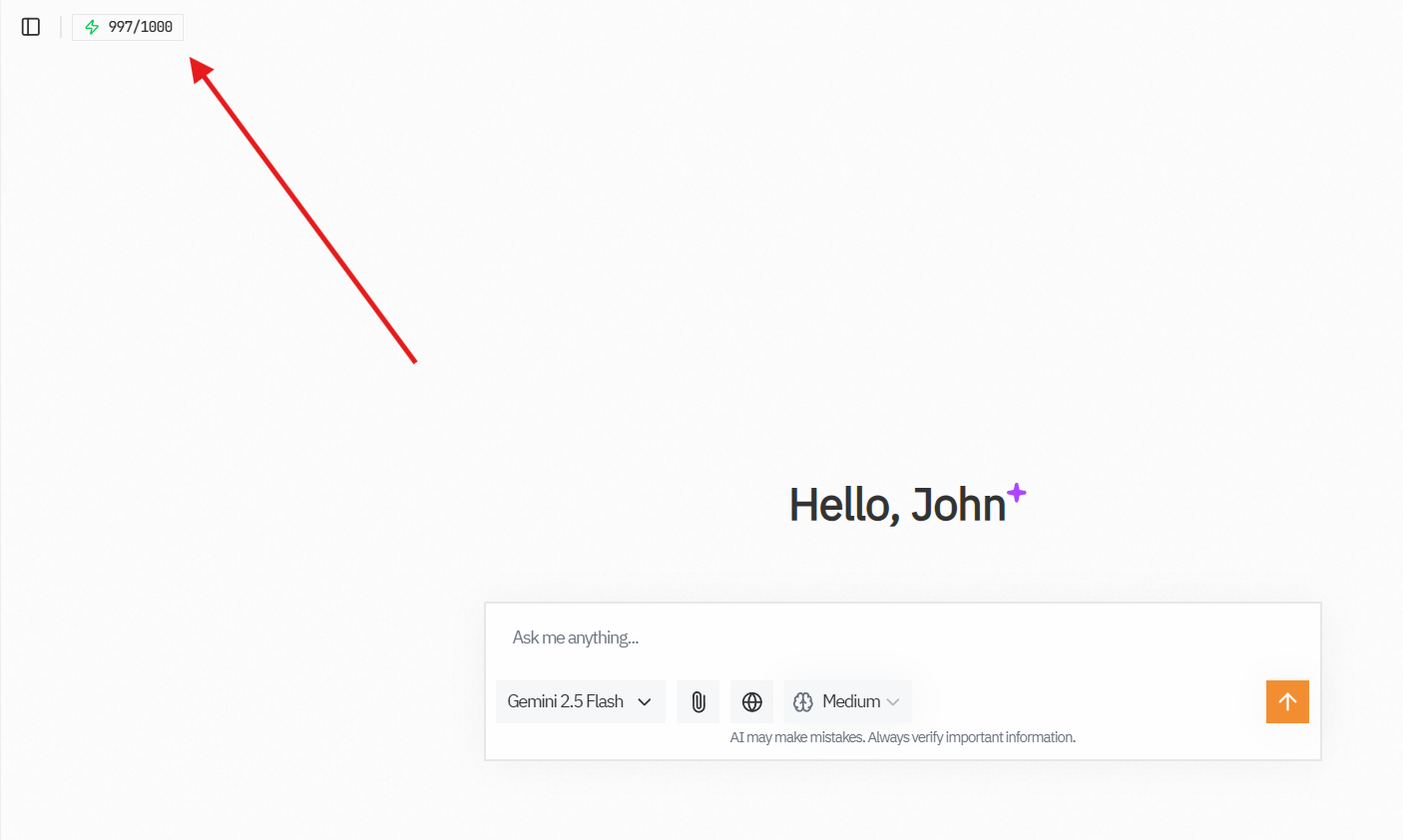
- Look for the usage indicator in the top-left
- Shows: "X / 1000 messages this month"
- Color coding:
- Green: Plenty remaining (0-700)
- Yellow: Getting low (700-950)
- Red: Out of quota
Usage Analytics
In Settings → Usage, you can see
- Total messages this month
- Average daily usage
- Usage by model
- Usage over time
- Usage Tokens
- A breakdown of your usage by model and time.

Reset Schedule
When Quotas Reset
Quotas reset automatically:
- Date: 1st of every month
- Time: 00:00 UTC (7:00 AM Bangkok time)
- New quota: Back to 1,000 messages
- Automatic: No action needed
Automatic Process
The reset is fully automatic. You don't need to do anything. just check back on the 1st!
What Happens at the Limit
Reaching 1,000 Messages
When you've used all 1,000 messages:
Notification appears warning you
Can't send new messages
Can still:
- View previous conversations
- Organize folders
- Export chats
- Browse the interface
- Manage settings
Options:
- Wait for monthly reset
- Add your own API key (BYOK)
- Contact support for extended quota
Strategies to Manage Quota
Be Efficient
1. Plan your messages:
- Think before sending
- Combine related questions
- Write clear prompts first time
2. Use appropriate models:
- Use faster models for simple questions
- Save powerful models for complex tasks
- Don't use Opus when Haiku will work
3. Edit instead of resend:
- Editing doesn't cost extra
- Regenerate instead of new message
- Retry instead of asking again
4. Organize conversations:
- Start new chat for new topics
- Don't repeat context unnecessarily
- Use folders to stay organized
Make Messages Count
Good practices:
✅ One clear, well-planned message
✅ Include all context upfront
✅ Ask for exactly what you need
✅ Edit and refine before sendingWasteful practices:
❌ Sending multiple short messages
❌ Sending without thinking
❌ Repeating same unclear question
❌ Not providing enough context firstExample: Efficient vs. Wasteful
Inefficient (uses 5 messages):
You: "Help" (1)
AI: "What do you need help with?"
You: "Code" (2)
AI: "What kind of code?"
You: "Python" (3)
AI: "What Python help do you need?"
You: "Sorting" (4)
AI: "What about sorting?"
You: "How to sort a list" (5)Efficient (uses 1 message):
You: "How do I sort a list in Python? I'm a beginner and need
a simple example with explanation." (1)
AI: [Complete, helpful answer]Options When Quota Runs Out
Option 1: Wait for Reset
Best for:
- Non-urgent needs
- End of month timing
- Prefer to stay within the included allowance
What to do:
- Mark calendar for 1st of next month
- Export important conversations
- Note questions to ask later
- Use other resources temporarily
Option 2: Bring Your Own Key (BYOK)
Best for:
- Heavy users
- Can't wait for reset
- Need unlimited access
- Have API keys already
Benefits:
- Unlimited messages
- All models available
- Full control over costs
- No monthly limits
See BYOK Guide for setup.
Usage Tips by User Type
Light Users (< 300 messages/month)
- Don't worry about quota
- Use AI freely
- Experiment with features
- Try different models
Medium Users (300-700 messages/month)
- Check usage weekly
- Plan important questions
- Use efficient prompting
- Consider BYOK for heavy months
Heavy Users (> 700 messages/month)
- Monitor usage regularly
- Consider BYOK
- Use efficient strategies
- Plan for reset timing
Quota Myths
❌ Myth 1: "Different models use different quota"
Reality: Standard models cost 1 message each. Only premium models with Diamond Icon consume extra quota (see the Quota Usage Comparison).
❌ Myth 2: "Longer messages use more quota"
Reality: Message length doesn't matter - each message counts as 1.
❌ Myth 3: "Web search uses extra quota"
Reality: Web search doesn't add to message count.
❌ Myth 4: "AI responses count against quota"
Reality: Only your messages count, not AI responses.
Understanding Fair Use
Fair Use Policy
The 1,000 message limit is for normal use:
Acceptable:
- Regular conversations
- Learning and studying
- Work and research
- Creative projects
- Daily questions
Not acceptable:
- Automated scripting
- Bulk processing
- Reselling access
- System abuse
- Sharing accounts
Account Sharing
Each account is for individual use only. Don't share your login credentials.
Strict Consequences
Any user found sharing accounts or violating the fair usage policy will have their account permanently suspended. In cases of severe or repeated misuse, the university reserves the right to pursue legal action as deemed appropriate.
Quota FAQs
Can I buy more messages?
No. Options are:
- Wait for monthly reset
- Use BYOK for unlimited access
- Contact support for extended quota
Do unused messages roll over?
No, quota resets to 1,000 on the 1st regardless of previous usage.
Can I check others' usage?
No, usage is private to each account.
What if I run out mid-conversation?
The conversation is saved. Continue it after reset or with BYOK.
Does quota differ by user type?
All KMITL users get the same 1,000 messages/month. If you have special needs, contact support for extended quota.
What about staffs vs. students?
Same quota for everyone with @kmitl.ac.th email.
Advanced Method
Use a spreadsheet:
- Date
- Messages used today
- Running total
- Messages remaining
- Average daily rate
Optimization Guide
Getting the Most Value
High-value messages:
- Complex problems needing deep reasoning
- Code reviews and debugging
- Learning new concepts
- Research and analysis
- Creative projects
Low-value messages:
- Questions you could Google
- Very simple queries
- Repeated questions
- Unclear prompts that need clarification
Quality Over Quantity
Better to send:
- 100 well-planned, high-quality messages
- Get useful answers each time
- Learn effectively
Than to send:
- 1,000 quick, unclear messages
- Get mediocre answers
- Waste quota on back-and-forth
Stay Informed
Check your usage regularly and plan accordingly. The 1,000 message limit is generous for thoughtful use!
Next Steps
- Learn BYOK for unlimited access
- Optimize with Better Results
- Improve Prompt Writing
- Configure Settings